Translations:Nastavení Outlook s MFA pro mobilní zařízení/3/en: Porovnání verzí
Skočit na navigaci
Skočit na vyhledávání
Bez shrnutí editace |
Bez shrnutí editace |
||
| (Nejsou zobrazeny 2 mezilehlé verze od stejného uživatele.) | |||
| Řádek 1: | Řádek 1: | ||
=== Add an Additional | === Add an Additional Verification Method === | ||
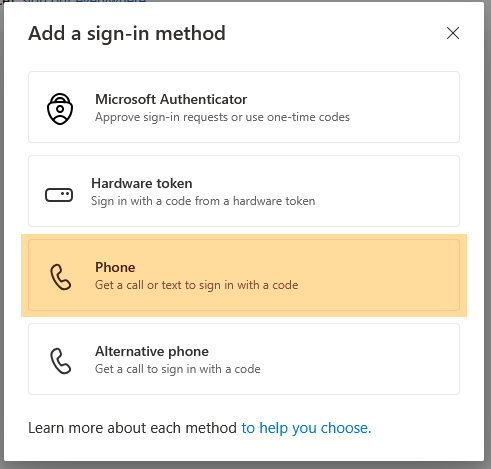
We strongly recommend configuring a backup verification method by enabling SMS verification. | |||
[[Soubor:Mfa-en8.png|střed|bezrámu|651x651pixelů]] | |||
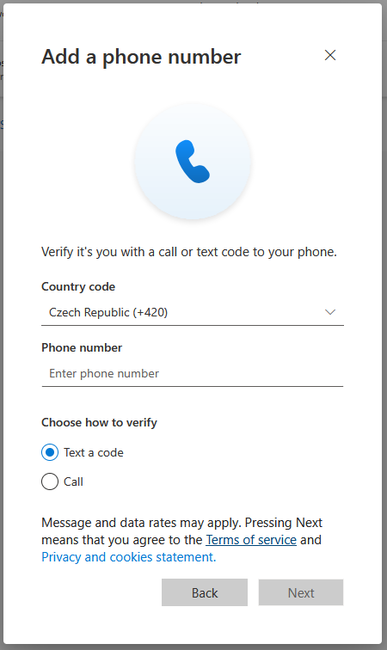
Enter your mobile phone number and click '''Next'''. | |||
[[Soubor:Mfa-en9.png|střed|bezrámu|651x651pixelů]] | |||
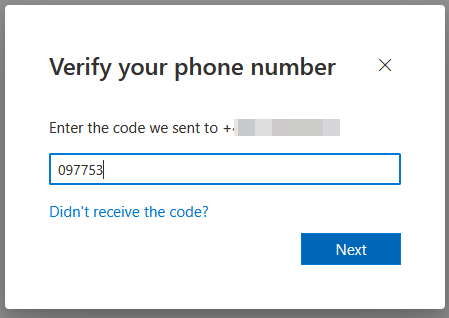
A text message (SMS) containing a verification code will be sent to your phone. Enter the code on your computer to complete the setup. | |||
[[Soubor:Mfa-en10.png|střed|bezrámu|651x651pixelů]] | |||
A text message (SMS) containing a verification code will be sent to your phone. | |||
Enter the code on your computer to complete the setup. | |||
Aktuální verze z 20. 7. 2026, 13:23
Add an Additional Verification Method
We strongly recommend configuring a backup verification method by enabling SMS verification.

Enter your mobile phone number and click Next.

A text message (SMS) containing a verification code will be sent to your phone. Enter the code on your computer to complete the setup.
