Translations:WiFi Eduroam pro Android/42/en: Porovnání verzí
Skočit na navigaci
Skočit na vyhledávání
(založena nová stránka s textem „In the Identity field, enter your PortalID@upol.cz and your Eduroam password ('''Click here for instructions on changing your password)'''. Set the CA Certificate: Do not verify. Click Connect and you will be connected to the eduroam network.“) |
Bez shrnutí editace |
||
| (Není zobrazena jedna mezilehlá verze od stejného uživatele.) | |||
| Řádek 1: | Řádek 1: | ||
In the Identity field, enter your PortalID@upol.cz and your Eduroam password ('''[[Navod_na_zmenu_hesla|Click here for instructions on changing your password)]]'''. Set the CA Certificate: Do not verify. Click Connect and you will be connected to the eduroam network. | In the Identity field, enter your PortalID@upol.cz and your Eduroam password ('''[[Navod_na_zmenu_hesla/en|Click here for instructions on changing your password)]]'''. Set the CA Certificate: Do not verify. Click Connect and you will be connected to the eduroam network. | ||
[[File:Novyandroid.jpg|center|320x525px|Wifi android 04.png]] | |||
Notice: '''Login is not an email address'''. For UP students, the user login will look like this: 20021111@upol.cz, dvorak04@upol.cz. For UP employees, the username will be the same as the login name for the portal, e.g. kocickov@upol.cz. Employees can find out their login name from the [[Speciální:MyLanguage/Spravci pocitacove site|computer network administrator]]. If you have forgotten your Portal ID, please contact the Helpdesk - select Anonymous request - and select the category Forgotten login. | |||
Aktuální verze z 26. 11. 2025, 14:28
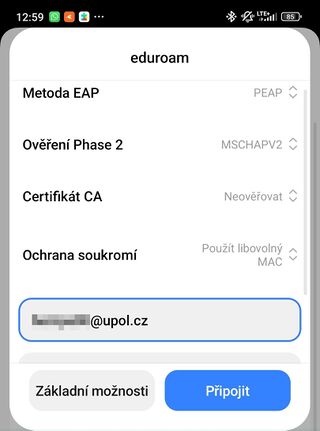
In the Identity field, enter your PortalID@upol.cz and your Eduroam password (Click here for instructions on changing your password). Set the CA Certificate: Do not verify. Click Connect and you will be connected to the eduroam network.

Notice: Login is not an email address. For UP students, the user login will look like this: 20021111@upol.cz, dvorak04@upol.cz. For UP employees, the username will be the same as the login name for the portal, e.g. kocickov@upol.cz. Employees can find out their login name from the computer network administrator. If you have forgotten your Portal ID, please contact the Helpdesk - select Anonymous request - and select the category Forgotten login.