Translations:WiFi Eduroam pro MS Windows 11/2/en: Porovnání verzí
Skočit na navigaci
Skočit na vyhledávání
(založena nová stránka s textem „'''Before you will start with the WiFi setup, make sure that you have a password set for the Eduroam network - the password for Eduroam or VPN is a different password than to Portal - you can find a ''manual for a password setup here'' ==Step 1 - Search for available networks== Click the '''Wireless Connection button [1]''' on your Start panel. Then select '''available network option [2].''' Soubor:Win11-wifi-1.jpg|střed|be…“) |
(Žádný rozdíl)
|
Aktuální verze z 30. 5. 2022, 04:52
Before you will start with the WiFi setup, make sure that you have a password set for the Eduroam network - the password for Eduroam or VPN is a different password than to Portal - you can find a manual for a password setup here
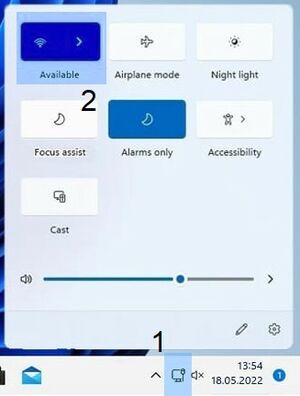
Step 1 - Search for available networks
Click the Wireless Connection button [1] on your Start panel. Then select available network option [2].
